 For macOS
Catch a video. Match it into Apple Music.
Paste a link or drop in a video file. CatchMatch converts it and puts it where you want it: Apple Music, Apple TV, or simply your Downloads folder. No subscription needed.
Three free imports to try it. 14-day refund. Personal use on all your Macs.
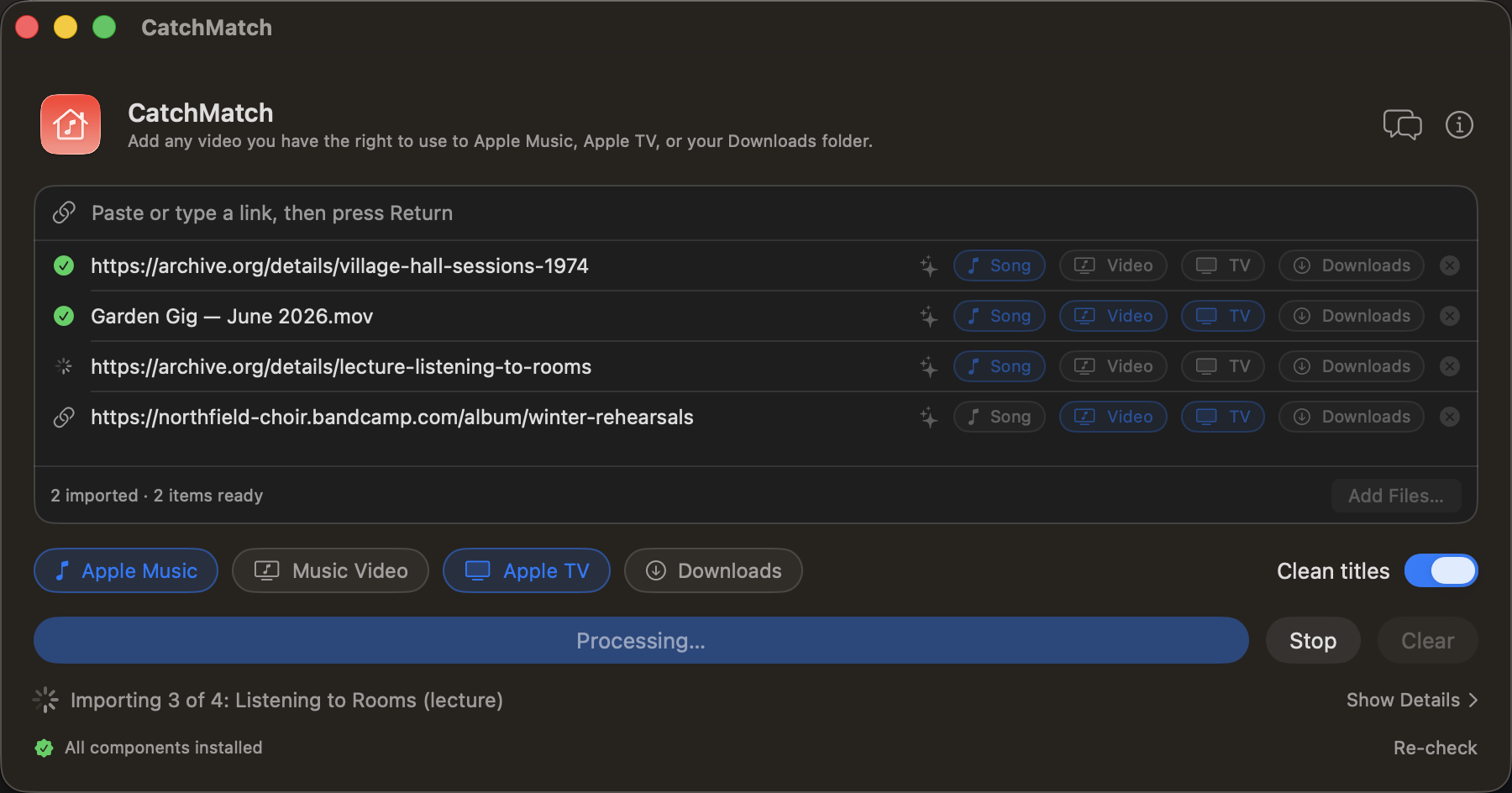
Three steps, no Terminal.
Everything runs on your Mac. Nothing you import passes through a server of ours.
Add a link or a file
Paste one or more URLs, drop them onto the window, or choose a local video. Playlists and channels expand into individual items.
CatchMatch converts it
It fetches the best available quality, keeps Apple-compatible streams untouched, and cleans up the title and artist.
It lands where you want it
The song goes to Apple Music and the video to Apple TV, through the folders Apple's apps import from automatically — or straight to your Downloads folder, if a library isn't where you keep things.
Music that isn't in the catalogue.
For material you have the right to use: things Apple Music will never carry.
Open archives
Concerts, sessions and lectures from Archive.org and other public-domain or Creative Commons sources, next to the albums you already own.
Live takes of music you own
The acoustic version an artist posted themselves, filed alongside the studio recording you bought.
Your own recordings
A gig filmed on your phone or a recorded talk: drop in the file and listen to it anywhere Apple Music runs.
Small, focused, and out of your way.
A native Mac app, signed with an Apple Developer ID and notarized by Apple. No account and no telemetry.
- Links and local files: paste, drop, or choose a file
- Apple Music and Apple TV: the song, the music video, or both, per item
- Or just the file: send it to your Downloads folder instead — no library needed
- Import queue that checks every item before it runs
- Cleaner titles: artist and title worked out from messy video names
- Subtitles kept in imported video
- Send from your iPhone: text a link to a chosen iMessage chat and the Mac imports it
- Automatic updates built in
Check this fits your setup.
If something here doesn't match, please don't buy. If it wasn't clear and you already did, just ask for a refund.
- macOS 14 Sonoma or later
- Apple Music with Sync Library, or iTunes Match, only if you want tracks on your other devices. Importing on this Mac — including straight to Downloads — needs neither.
- Apple TV holds video on this Mac. There is no iCloud sync for your own video the way there is for music, so a film or music video imported here stays here. Home Sharing streams it to an Apple TV or iPhone on the same network.
- A one-time setup step installs the media components the app needs. The first-run check walks you through it.
- Material you have the right to use. That part is up to you.
Frequently asked.
What can I use it with?
Material you have the right to use: your own recordings, music you bought on Bandcamp, and public-domain or Creative Commons sources like Archive.org. It converts the links or files you give it with open-source components, then hands the result to Apple Music, Apple TV or your Downloads folder. It doesn't get around DRM, and it isn't meant for services whose terms forbid downloading.
Do I need Apple Music or iTunes Match?
No. Turn on Downloads and the finished file lands in your Downloads folder, with no library involved. Apple Music with Sync Library, or iTunes Match, is what carries a track from your Mac to your iPhone, iPad and HomePod — useful, not required. Importing to Apple TV needs neither: the video goes into the TV app on this Mac.
Why isn't it on the Mac App Store?
The App Store doesn't accept apps built on the open-source components this one needs. CatchMatch is signed with an Apple Developer ID and notarized by Apple, so macOS opens it normally.
What happens after the three free imports?
Enter the license key from your Gumroad receipt in Settings and the limit goes away. One purchase covers all the Macs you personally use.
How do refunds work?
Within 14 days, for any reason. Email me with your Gumroad order number. See the refund policy.
Is there an iPhone app?
Not a separate one. You can already send links from your iPhone through an iMessage chat the Mac watches.
Bring it into your library.
$9.99, one time. Try three imports first.
Buy on Gumroad